3D rendering
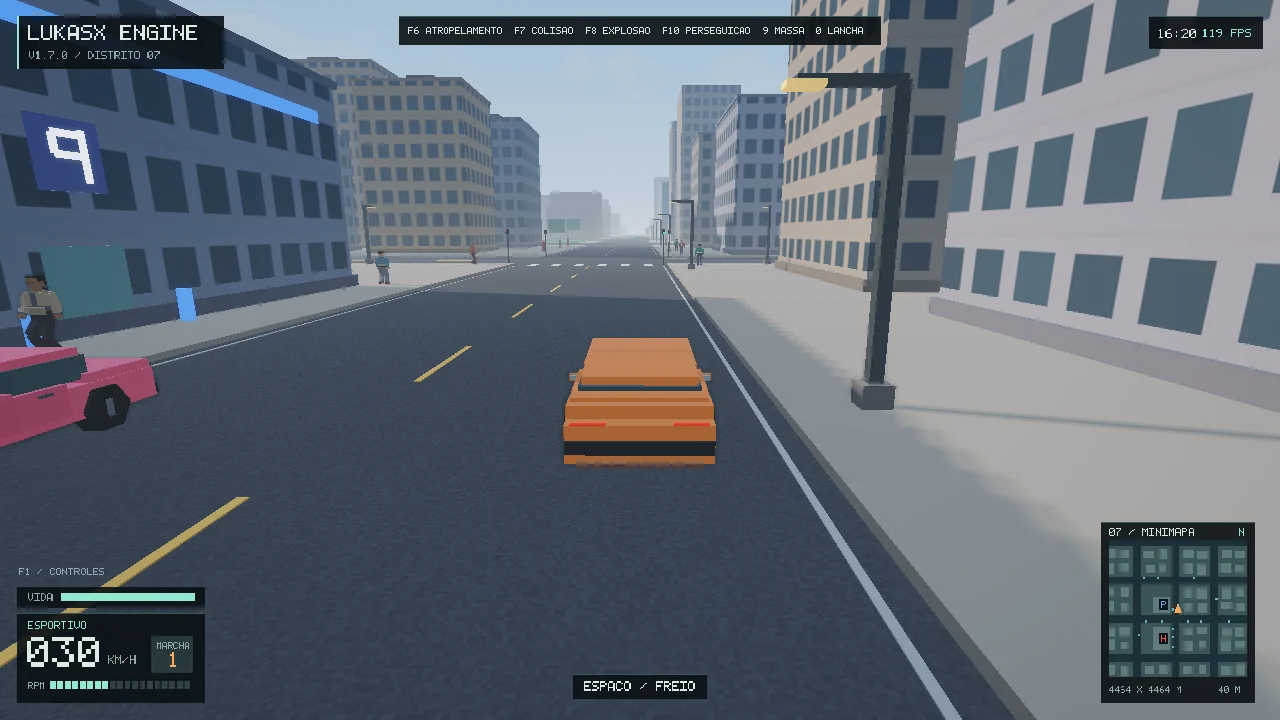
OpenGL 4.5 with PBR, three shadow cascades, procedural skies, rain, and water.
Release 1.7.1 · MIT
A C++17 3D engine for experimenting with open worlds, vehicle simulation, and character physics.
01 / RUNTIME
OpenGL 4.5 with PBR, three shadow cascades, procedural skies, rain, and water.
Suspension, articulated ragdolls, detachable car parts, and impact effects.
A procedural island with a city, roads, pedestrians, traffic, chases, and speedboats.
02 / Downloads
Windows x64 ZIP · 0.64 MiB
Extract the entire ZIP and open Jogar-Distrito-07.cmd. Press F1 to view the controls.
Distrito-07-Demo-1.7.1-Windows-x64.zipDownload Windows demo C++ SDK ZIP · 6.9 MiB
Includes the source code, dependencies, and a CMake example. Start with 00-LEIA-ME-READ-ME.txt.
LukasX-Engine-SDK-1.7.1-Cpp.zipDownload SDK Verify SHA-256Read the MIT license
Version 1.7.0 remains available, unchanged.
Download Windows demo · 0.64 MiBDownload SDK · 6.89 MiBVerify SHA-256
03 / CHANGES
A physics and gameplay update on top of 1.7.0. The SDK, the example, and the demo are the same, with these changes.
More torque and grip on slopes, in reverse too. A car overlapping a wall or another vehicle is pushed back out, and one that sits still with the gas held gets a nudge toward the free side.
People take 0.55 to 0.95 s to react to the player’s car and dodge with a human stride. At a crawl, holding the gas into someone for 0.35 s knocks them over.
The steering answers faster at town speed, and the cornering ceiling goes from 60% to 75% above what the tyres would give. Above 110 km/h the behavior is the same.
25 automated tests pass, including the new climb and runover groups. The performance figures are from 1.7.0 and were not repeated. The full notes are in docs/RELEASE-NOTES.md inside the SDK.
04 / INSTALL
The SDK is distributed as source code. On Windows x64, with CMake 3.24+ and Visual Studio Build Tools (Desktop development with C++ and a Windows SDK), follow these steps.
Extract the whole ZIP to a short path such as C:\Dev. The source code, shaders, and dependencies (GLFW, GLM, and GLAD) are inside.
Open the Visual Studio x64 Native Tools Command Prompt and go to the extracted folder.
Run build.cmd. Then ctest --test-dir build --output-on-failure checks the simulation and jogar.cmd opens Distrito 07.
The ZIP also includes README.md, docs/SDK.md, and the example in examples/starter. If the build fails right away, check that the terminal is the x64 Native Tools one and that the folder path is short.
05 / MINIMAL EXAMPLE
The SDK includes examples/starter, a standalone CMake project that runs the simulation without a window or a GPU. It loads the cornering scenario, advances 240 frames of 1/60 s (480 ticks at 120 Hz), and exits with code 0 if the car traveled more than 20 m without impacts.
cmake -S examples/starter -B build-starter -G "NMake Makefiles" -DCMAKE_BUILD_TYPE=Release
cmake --build build-starter
ctest --test-dir build-starter --output-on-failure
build-starter\lukasx_starter.execmake_minimum_required(VERSION 3.24)
project(LukasXStarter LANGUAGES CXX)
set(LUKASX_SOURCE_DIR "${CMAKE_CURRENT_LIST_DIR}/../.." CACHE PATH "LukasX Engine SDK source directory")
add_subdirectory("${LUKASX_SOURCE_DIR}" "${CMAKE_CURRENT_BINARY_DIR}/engine" EXCLUDE_FROM_ALL)
add_executable(lukasx_starter main.cpp)
target_link_libraries(lukasx_starter PRIVATE LukasX::Core)
enable_testing()
add_test(NAME starter_drives COMMAND lukasx_starter)
#include <lukasx/core.hpp>

#include <iostream>

int main() {
    ax::Game game;
    game.resetScenario(ax::Scenario::Corner);
    const auto start = game.focus().p;

    ax::FixedStep clock;
    int ticks = 0;
    for (int frame = 0; frame < 240; ++frame) {
        clock.addFrame(1.0 / 60.0);
        while (clock.nextTick()) {
            game.tick(ax::cornerPilot(game));
            ++ticks;
        }
    }

    const auto distance = glm::distance(start, game.focus().p);
    const auto& vehicle = game.ecs.get<ax::Vehicle>(game.car);
    std::cout << "LukasX " << LUKASX_VERSION << " | " << ticks << " ticks | "
              << distance << " m from spawn | " << vehicle.speed * 3.6f << " km/h\n";
    return ticks == 480 && distance > 20.f && game.telemetry.impacts == 0 ? 0 : 1;
}
06 / CMAKE
Put the SDK inside your project folder (for example, third_party/lukasx), add it, and link your executable to LukasX::Core. The OpenGL 4.5 renderer is a separate target, LukasX::Renderer: turn on LUKASX_BUILD_RENDERER before add_subdirectory.
# Optional: the OpenGL 4.5 renderer (set it before add_subdirectory)
# set(LUKASX_BUILD_RENDERER ON)
add_subdirectory("${CMAKE_CURRENT_SOURCE_DIR}/third_party/lukasx" "lukasx-build")
target_link_libraries(my_game PRIVATE LukasX::Core)
07 / LUKASX GAMES
Engine created by Lucas Gabriel (LukasX Games). The original code is MIT licensed. GLFW, GLAD, and GLM notices are included in each package.